|
| Â |
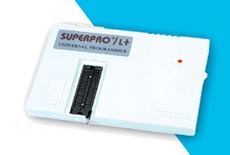
Xeltek SuperPro L+ 48-pin Universal Programmer (Parallel Port) |
 |
|
 |
|
|
| Â |
The Superpro L+ is a low-cost Universal Programmer supporting over 3,900+ devices including
many popular (E)EPROMs, FLASH, CPLDs, GALs and Microcontrollers. The programmer features
a 48-pin Zero Insertion Force (ZIF) socket allowing it to support any device up to 48 pins in
Dual-in-line (DIL) package.
Support is offered for the popular 8051 and Microchip PIC microcontrollers making this programmer
ideal for microcontroller development. The Superpro L+ programmer connects to the PC Parallel
(LPT) port yielding very fast data transfer speeds. The software is powerful and yet easy-to-use and
support all the standard programming operations.
DISCONTINUED PRODUCT
|
| Â |
|
|
|
 |
PC Driver Software |
|
- File: Load and save file in binary, Intel (extended) Hex, Motorola S or Tektronics (extended) Hex format. Multiple load, format conversion, relocation etc...
-
DOS shell, Change directory, Print, Quit
-
Buffer: HEX-ASCII Edit, Fuse Map Edit, Checksum, Swap, Vector Table edit
-
Select: Bidirectional search device by device name or by manufacturer name
-
Device: Blank Check, Read, Program, Verify, Security, Fuse, Erase, Word format select and funtions related to specific device
-
Test: TTL/CMOS Test, Memory Test, Vector Test, Test Pattern Edit, Auto Identify TTL/CMOS Device
-
Others: Macro, Options, Environment etc...
-
This shoftware is designed to work with Windows 98, ME and 2000. Correct operation on Windows XP is possible but is not guaranteed.
|
|
Device Support |
|
- Supports 3,900+ devices, including most E(E)PROM,Series E(E)PROM. FLASH
-
GAL, EP3xx/6xx/9xx, PEEL, PALCE, PLUS, PLS, PLH, PLC, ATV, ATF, CPL, 85Cxxx, 5Cxxx, DS12xx
-
Microcontrollers 87xx / 89xx / Z86Exx / TMS320xxx / D77Pxx / D78Pxx / PD75xxx / HD6370xxx / PIC16Cxx/17Cxx, and PSD3XX
-
Please note: The Device Support list for this programmer is fixed. New devices will not be added in the future.
|
|
Hardware Features |
|
- Connects to PC via PC Printer Port (LPT) Interfaces (parallel communication, uses address 278H,378H, 3BCH)
-
Easy interface to LAPTOP, PC, PS/2 or compatibles
-
48-pin Zero Insertion force (ZIF) Socket
-
External mains power supply adaptor
-
High speed programming, cost-effective Hardware and Flexible Software
|
|
Device Update Policy |
|
- The Superpro L+ programmer is considered an entry product with basic support.
-
Device update is infrequent and there is no set schedule available. New devices will not be added in the future.
-
Please check the Device Support List and make sure the devices in your application are supported at present time
-
You (can get the latest software) may download the current software version free of charge - See the Downloads link
|
|
Hardware and Electrical Specification |
|
- PC Connection: Parallel Printer Port (LPT)
-
AC Adapter : Input AC 220V or 110V
-
Device socket : One 48 pin ZIF socket
-
Power supply : Input AC 100 to 240V , Output : DC 12V @ 1.5 Amp
-
Programmer Dimension : 7 3/4" L x 5 1/2" W x 3/4" H
-
Shipping Weight : 1.8 Kg
|
|
Feature Comparison with Superpro Z programmer |
|
|
The Superpro L+ programmer is the replacement programmer for the now discontinued Superpro Z programmer.
A comparison of these two programmers is detailed in the table below:
Gta San Andreas Highly Compressed 700mb 'link'
To install a "highly compressed" 700MB version of GTA San Andreas
Mod Compatibility:
Most highly compressed versions still support popular mods like CLEO, allowing you to add custom cars or scripts later. Installation Tips To get the game running, you generally need to: Gta San Andreas Highly Compressed 700mb
The world of gaming has come a long way since its inception, with numerous iconic games that have left an indelible mark on the industry. One such game that still holds a special place in the hearts of gamers is Grand Theft Auto: San Andreas. Released in 2004, this action-adventure game was developed by Rockstar North and published by Rockstar Games. It was a critical and commercial success, praised for its engaging gameplay, rich storyline, and impressive graphics. In this article, we'll be discussing the highly compressed version of GTA San Andreas, which weighs in at just 700mb. To install a "highly compressed" 700MB version of
| Aspect | Rating (1–10) | |--------|----------------| | Download size | 9 | | Stability | 3 | | Content completeness | 2 | | Safety | 1 | | Overall for casual play | 4/10 (if you have no other option) | Find a reliable source : Look for a
Q: The game asks for DirectX 9.0c. Where do I get it?
A: Microsoft removed the official download, but you can download "DirectX Web Installer" (legacy version) from major gaming sites. Or, simply install vcredist_x86.exe from the _Redist folder.
Safer Alternatives (Community Repacks):
Look for repacks by trusted groups like Mr DJ , BlackBox , or FitGirl (though FitGirl's is usually 1.2GB, not 700MB). Mr DJ’s 700MB version is widely considered the most stable for low-end PCs.
: The most common method involves removing the radio stations and cutscene dialogue, which account for nearly 80% of the game's original size. Asset Redundancy : Tools like
- Find a reliable source: Look for a reputable website that offers the compressed version of the game.
- Download the game: Download the game from the website.
- Extract the files: Extract the files using a compression tool like WinRAR or 7-Zip.
- Install the game: Follow the installation instructions to install the game.
|  |
| Product Information |
| Xeltek SuperPro L+ 48-pin Universal Programmer (Parallel Port) |
| Xeltek |
|
XEL-SuperproL+ |
| Discontinued Product |
|
| Â |
|
| Â |
| Â |
|
| Â |
|
|
|
|
|